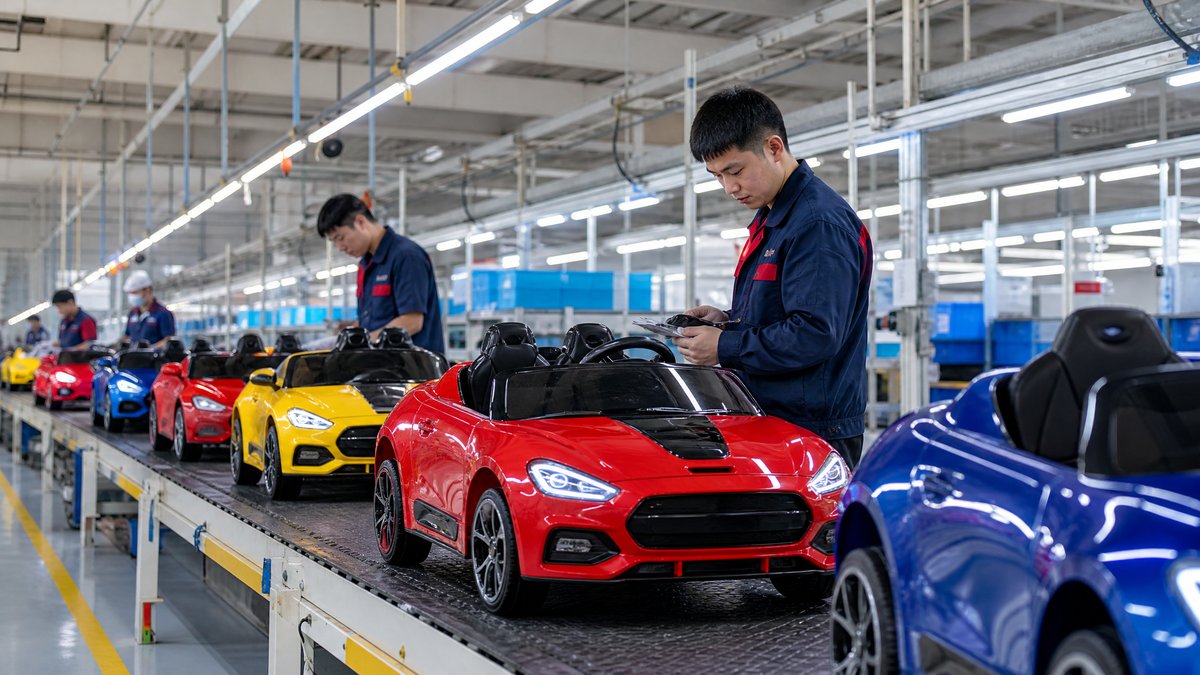
For retailers, product filters are more than a website feature. They are a way to help parents, gift buyers, dealers, and business customers narrow a large kids ride-on car range without misunderstanding the product. A well-designed filter system can reduce unsuitable clicks, make product comparisons easier, support accurate merchandising, and give importers and distributors a clearer brief for future purchasing.
The short answer is to build filters around real buying decisions rather than internal SKU codes. Start with verified attributes such as recommended user range, seating layout, power system, control method, use environment, product dimensions, and design category. Use plain-language labels, avoid overlapping values, show only filters supported by reliable product data, and review filter performance after each season. Every displayed value should match the relevant product page, manual, packaging information, and supplier-confirmed specification.
This guide explains a practical approach for overseas retailers, wholesalers, distributors, importers, and OEM buyers. It focuses on product-listing and category filters, not the broader question of how to improve a website’s general search box.
Why Product Filters Matter for Kids Ride-On Cars
Kids ride-on cars can look similar in a grid while differing materially in intended use, size, seating, control options, power configuration, packaging, and retail positioning. A shopper who cannot quickly narrow the range may leave the page or choose a product that does not fit the intended child, room, vehicle, or sales channel.
For a B2B retailer, unclear filters increase basic specification questions, create inconsistent comparisons, and can lead buyers toward models that do not fit the intended assortment. They also make customer-service and merchandising reports less reliable.
Filters should therefore support a consistent path from need to SKU. A buyer might start with “one child, indoor and outdoor play, parental control, compact footprint,” while a distributor might start with “two-seat models, a defined product category, and a carton size suitable for the planned channel.” The interface should accommodate both without making safety promises or unsupported performance claims.
Build the Filter Set Around Buyer Questions
Before adding a facet, write the question it answers. If no clear buyer question exists, the attribute may belong in a technical specification table rather than a filter.
1. User and fit information
Age-related filters require careful wording. A retailer can provide the manufacturer’s stated recommended age or user range when it is available, but should not convert it into a universal safety conclusion. Consider labels such as “recommended age range,” “user-fit guidance,” or “manufacturer-stated age guidance,” depending on the information supplied by the manufacturer and the requirements of the selling market.
Dimensions and seating are often more actionable than age alone. Useful values can include:
- Single-seat or two-seat configuration
- Product length, width, and height bands
- Seat or cockpit layout
- Stated user or load guidance, if supplied and appropriately presented
- Product weight band for handling and delivery planning
Do not infer suitability from a photograph. If a dimension is important, show the measurement in a consistent unit and link it to a fuller [kids ride-on car product collection](/products/kids-ride-on-cars) or specification page.
2. Power and control attributes
Voltage is a useful comparison field when it is verified, but it should not be used as a shortcut for age, speed, climbing ability, or safety. A filter such as “power system” can help buyers compare product configurations, while the product page should explain exactly what the supplier has specified.
Control-method filters may include “child-operated,” “parental remote control included,” or “dual control,” provided the listing clearly states what is included with the particular SKU. A remote may be optional for one model and included for another. That distinction belongs in structured product data, not only in sales copy.
Other useful fields include charging interface or charger inclusion, battery type where documented, and drive configuration where the supplier has provided consistent terminology. Avoid filters such as “long battery life,” “fast,” or “strongest” unless the retailer has a documented, comparable basis and the wording is permitted for its market. In many cases, these are better handled as neutral specifications or editorial content.
3. Use environment and retail use
Environment filters help a shopper select a product for a relevant setting without promising performance. Possible labels include “indoor-oriented,” “outdoor-oriented,” or “indoor and outdoor use,” but each value should be based on the manufacturer’s instructions and limitations. Do not imply that a ride-on car is weatherproof, suitable for every surface, or safe on slopes unless the documentation specifically supports that statement.
For B2B ranges, add merchandising-oriented fields that support the selling channel:
- Home-use range
- Giftable product
- Premium or entry-level assortment position
- Retail display suitability
- OEM or private-label availability
- Replacement-parts program available, if confirmed
These are not all consumer-facing filters. A wholesale portal can expose them to approved buyers, while a consumer storefront may use simpler labels.
Use a Controlled Vocabulary for Every Facet
The same attribute must have one agreed name and a limited set of values. For example, do not mix “2 seater,” “two-seater,” “double seat,” and “2 seats” across product records. Choose one customer-facing label—such as “Seating: Two-seat”—and map supplier terminology to it internally.
Create a filter dictionary with at least five columns:
| Field | What to record |
|---|---|
| Attribute name | The customer-facing label, such as Seating |
| Allowed values | The exact approved choices |
| Definition | What each value means and does not mean |
| Source | Supplier specification, manual, sample check, or approved artwork |
| Owner and review date | Who maintains the field and when it was last checked |
This is particularly important when several factories or OEM programs feed one catalog. A supplier may call a product “remote control,” while another means “remote-ready.” Those are different values and should never be merged without confirmation.
Controlled vocabulary also makes export catalogs, dealer sheets, marketplace feeds, and purchasing documents easier to maintain. It supports a [B2B product catalog](/blog/kids-electric-ride-on-car-product-catalog) that buyers can scan consistently.
Make Filter Labels Clear and Neutral
Filters should be understandable without a sales representative. Prefer “Number of seats” to “capacity,” because capacity could be interpreted as weight, passenger count, or battery capacity. Prefer “Parental remote control” to “smart control” when the actual feature is a remote handset. Prefer “Product width” to “compact,” unless “compact” has a documented range defined by the retailer.
Add short help text where a term may be misunderstood. For example, “Manufacturer-stated age guidance” tells a parent that the field is not a substitute for reading the product instructions. A filter for “licensed design” should identify a verified licensed product where applicable; it should not be used for a generic vehicle shape that merely resembles a known brand.
Do not use safety-related labels as promotional badges unless the claim has been reviewed for the destination market. Keep the filter neutral and direct the customer to the instructions, warnings, and product details. Retail teams can use the [safety features checklist](/blog/kids-electric-ride-on-car-safety-features-checklist) as a separate buying resource, without turning every checklist item into an unverified filter.
Match Filters to the Information Buyers Actually Need
A long filter sidebar is not automatically useful. Prioritize facets according to the customer’s purchase journey and the completeness of your data.
A consumer-facing store may put these first:
1. Recommended age or user guidance; 2. seating configuration; 3. control method; 4. product dimensions; 5. design or vehicle style; 6. indoor/outdoor guidance; 7. color.
A wholesale portal may instead prioritize SKU and model family, seating configuration, power and battery fields, carton and product dimensions, OEM/private-label status, packaging format, and confirmed spare-parts or after-sales availability.
The order should be tested, not assumed. Review filter usage, zero-result pages, product-detail exits, inquiry questions, and sales-team feedback. A filter that is rarely used may still matter for a specialist buyer, while a high-use filter may reveal that the catalog lacks a key attribute.
Connect Filters to Accurate Product Data
Filters work only when the underlying data is complete and consistent. Before launching a facet, audit the source records for every applicable model. Check that the value is present on the product page, in the internal catalog, and in the supplier documentation used for the listing.
Use a product-information checklist for each SKU:
- Model name and internal SKU match across systems.
- Measurements use a stated unit and measurement convention.
- Seat count and control method are verified for that exact model.
- Included accessories are separated from optional accessories.
- Battery and charger information is documented without extrapolation.
- Product photographs match the selected color and configuration.
- Warnings, instructions, and age guidance are available for review.
- Packaging and shipping fields are kept separate from product-use claims.
If an attribute is unknown, use “not specified” internally and decide whether to hide the filter value from customers. Do not place an item into “two-seat,” “remote included,” or another facet simply because it looks similar to a related model.
For OEM programs, establish who approves changes to a filter value. A color update, seat revision, wheel change, or control-panel change can make an old listing inaccurate even when the model name remains similar. Buyers should also record the revision date in their product master data.
Design the Results Page for Comparison
After a filter is applied, the results page should help the buyer understand why the remaining products differ. Show concise, consistent comparison fields such as seating, user guidance, product dimensions, control method, and verified power information. Keep marketing copy secondary to the facts needed for selection.
Useful design practices include displaying active filters as removable chips, making one-click clearing easy, showing the number of matches where possible, preserving selections when users return from a product page, avoiding dead-end combinations, and providing a clear comparison route. Sorting can use relevance, newest model, or merchandising priority without implying that one model is universally best.
For international sales, show units and terminology appropriate to the destination market, while preserving the source measurement in internal records. Translation should be reviewed by someone familiar with toy and product terminology. Literal translation can turn a precise field into an ambiguous promise.
Use Filters to Improve B2B Assortment Planning
Filters can also improve purchasing decisions before products reach the storefront. An importer can export the filtered catalog to identify gaps, such as no two-seat model in a target collection, too many products with the same color, or missing documentation for a planned market.
A practical quarterly review can ask:
- Which attributes generated the most product views or inquiries?
- Which combinations returned no products but reflect real buyer needs?
- Which SKUs have missing or conflicting values?
- Are new OEM models using the existing vocabulary?
- Did returns or customer questions reveal an unclear filter label?
- Should a low-volume facet remain visible for specialist buyers?
For example, a distributor planning a family-oriented assortment might filter for two-seat products, then separately review product dimensions, packaging, control method, documentation, and replacement-parts planning. The filter narrows the range; it does not replace sample approval, quality review, or market-specific compliance work.
Retailers should also distinguish product filters from commercial filters. “In stock,” “preorder,” “new arrival,” and “wholesale pack” can be useful merchandising controls, but they should not be mixed with physical product attributes in a way that confuses the customer.
Common Filter Mistakes to Avoid
Too many near-duplicate facets
“Vehicle type,” “style,” “shape,” and “design” may all describe the same decision. Consolidate them unless each has a clear definition and purpose.
Filters based on unsupported claims
Do not create values such as “all-terrain,” “waterproof,” “extra safe,” or “best for slopes” from a photograph or a salesperson’s assumption. Ask for supporting documentation and use neutral wording when evidence is limited.
Treating voltage as a complete product comparison
Voltage alone does not describe fit, control, intended environment, dimensions, or the total configuration. Keep it as one field among several.
Hiding important information behind filters
A customer should not need to select a filter to discover warnings, assembly requirements, charging instructions, or limitations. Those belong on the product page and in the supplied documentation.
Allowing inconsistent variants to create duplicate products
If color or packaging creates a variant, define whether it should be a separate SKU, a selectable option, or a single product record. Duplicate records make inventory and filter counts misleading.
Frequently Asked Questions
What are the most useful filters for kids ride-on cars?
Start with manufacturer-stated user guidance, seating configuration, product dimensions, control method, verified power or battery fields, design category, and intended use environment. The best set depends on whether the store serves consumers, dealers, or wholesale buyers.
Should retailers use age as a product filter?
Yes, when the retailer has reliable manufacturer-stated age guidance and presents it carefully. Age should not be treated as the only suitability measure or as a universal safety conclusion. Pair it with dimensions, seating, instructions, and other relevant product information.
Should voltage be used to recommend a ride-on car?
Voltage can help customers compare documented configurations, but it should not be used by itself to claim that a product is faster, safer, or suitable for a particular child. Explain the full specification and follow the manufacturer’s instructions.
How can a retailer keep filters accurate after an OEM change?
Use a controlled product master, assign an owner, record the source and review date for each attribute, and require approval before changing a live filter value. Recheck listings, images, manuals, packaging, and dealer materials whenever the model configuration changes.
What should a retailer do when a supplier has not confirmed an attribute?
Keep the value unassigned internally and request confirmation. Hide the facet value from customers until the information is verified. Never infer a specification from a similar model or from product photography.
Conclusion
Better kids ride-on car product filters begin with better product information. Define the buyer question behind each facet, use controlled vocabulary, separate verified specifications from marketing claims, and show only values that the retailer can support. Combine filters with clear product pages, comparison tools, instructions, and a regular catalog review.
For importers, wholesalers, distributors, and OEM buyers, this approach improves more than online navigation. It creates a shared language for supplier briefs, product approvals, dealer catalogs, and customer service. If you are building or refining a kids ride-on car range, [contact KidsRideCar](/inquiry) or email info@kidsridecar.com to discuss product data, private-label requirements, and a buyer-focused assortment.
Official references
Explore these external resources for current regulatory and trade guidance. Confirm requirements with the relevant authority before placing an order.
Ready to Start?
Factory-Direct · CE & ASTM Certified · MOQ from 50 Units
Our export team works with buyers in 60+ countries. Get a quote within 24 hours.
KR
Written by KidsRideCar
China's leading kids electric ride-on car manufacturer. 500,000+ units shipped annually to 60+ countries. CE, ASTM & EN71 certified.