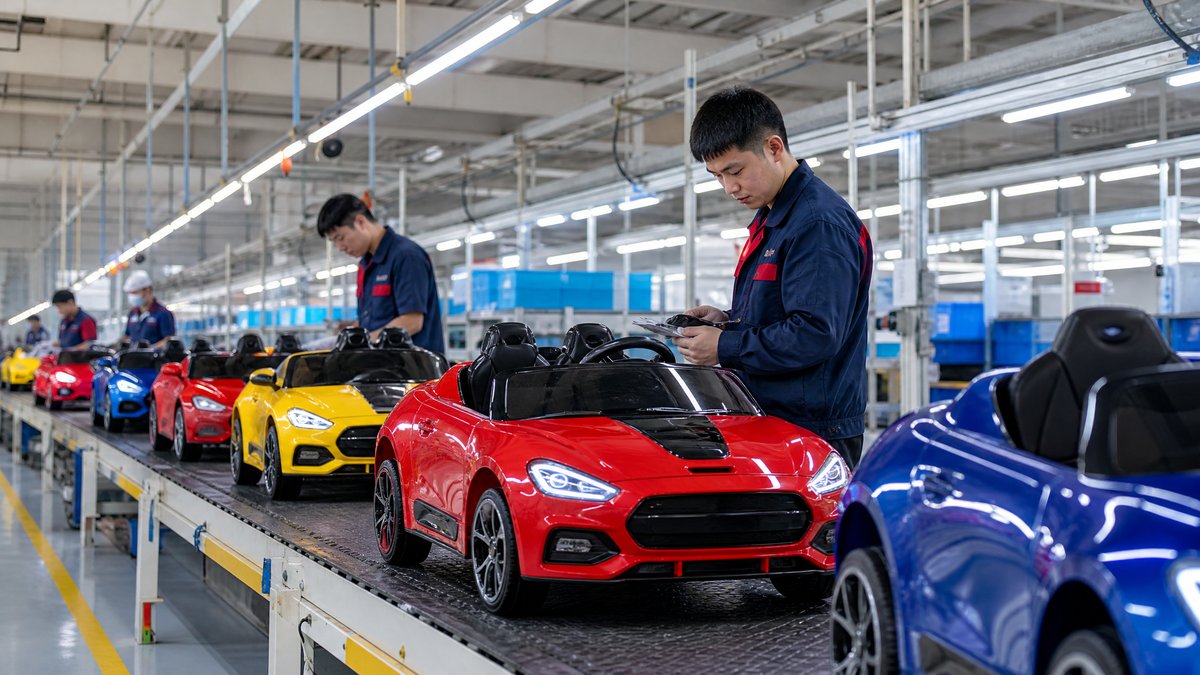
For an OEM buyer, a graphic change is not just a new logo or a different sticker. It can affect the product sample, packaging, instruction materials, product photography, SKU identification, spare-part records, and the approval trail shared with a supplier. If an artwork revision is handled informally, an older file may reach production while the newer file appears on the carton or online listing.
The practical answer: manage every graphic change through a controlled workflow. Define the exact surfaces and files affected, issue one clearly named artwork package, approve a physical or digital proof, record the effective production lot, and check the finished goods against the approved version before shipment. Keep safety-related labels, warnings, controls, and user information separate from decorative graphics and review them with the appropriate market requirements in mind.
This approach helps importers, wholesalers, distributors, retailers, and private-label buyers make design updates without losing traceability.
What counts as a graphic change on a kids ride-on car?
A graphic change is any visual or printed element that differs from the approved product presentation. Common examples include:
- A new brand logo on the hood, side panel, seat, or dashboard
- A revised racing stripe, character illustration, pattern, or color block
- A different model name, product number, or edition mark
- A change to decorative decals, wheel labels, badges, or printed controls
- Updated warning, age, care, or user-information artwork
- A replacement of a licensed-looking visual with an owned or generic design
- A change to the carton, quick-start sheet, manual cover, hangtag, or label that accompanies the car
A small visual change can affect SKUs, listing images, warehouse identification, and required-information review. Graphic control is therefore a document, production, and inventory task.
Step 1: Write a complete graphic-change brief
Start with a short change brief before sending files to the factory. The brief should tell the supplier what is changing, what must remain unchanged, and where each element belongs.
At minimum, include:
1. Project and product identity: supplier name, internal project code, model name, voltage or configuration if relevant, and the buyer's SKU.
2. Change reason: for example, a brand refresh, a market-specific assortment, a retailer requirement, or correction of an outdated product name.
3. Affected surfaces: list the exact locations, such as left door, right door, hood, dashboard, wheel center, seat, carton front, or manual cover.
4. Graphic treatment: specify whether the item is a decal, printed panel, molded badge, label, transfer, or another agreed method. Do not assume that a file change automatically means the physical application method stays the same.
5. Text and language: provide the exact wording and language for every visible text element. Mark text that must not be translated or altered.
6. Reference files: identify the source artwork, placement drawing, product photographs, and any approved sample images.
7. Effective timing: state whether the update applies to a new order, a new production lot, a specific carton batch, or all future production.
8. Non-changes: list features, labels, safety information, dimensions, colors, or locations that must remain as previously approved.
A useful brief prevents a vague instruction such as “please update the sticker” from becoming several different interpretations across production, packaging, and marketing teams.
Step 2: Use a single source of truth for files
OEM buyers should maintain one controlled artwork package rather than sending scattered attachments through email or chat. The package can include the editable source file, print-ready exports, placement diagrams, a written change log, and a PDF preview for quick review.
Use a consistent naming structure, such as:
`KR-240-OEM-BLUE-DECALS-REV03-2026-10-25`
The name should identify the project, scope, revision, and date. Record any supplier-code equivalent in the purchase documentation. Avoid filenames such as `final.ai` or `new-final.pdf`; change the revision number whenever an approved element changes and mark withdrawn files as superseded.
For artwork handover, provide:
- A print-ready file in the format agreed with the supplier
- Vector artwork where practical for logos and line graphics
- Fonts converted or supplied according to the production workflow
- Color references and a note explaining which elements require visual matching
- A placement guide with orientation and dimensions
- A flattened preview showing the intended result
- A list of linked images and their intended resolution or use
- A change log describing every meaningful difference from the prior revision
The package should be readable by both design and production contacts; an attractive file is not enough if scale, position, or revision is unclear.
Step 3: Separate decorative graphics from safety and product information
Not every visible mark should be treated as decoration. Warning statements, age guidance, electrical information, care instructions, product identification, and other user-facing information may have separate review requirements in the target market.
Keep these elements clearly identified in the brief. Do not cover, shrink, relocate, or translate them casually as part of a decorative update. Ask the supplier to show how the revised design coexists with required information on the product and packaging. Confirm the final wording and review responsibilities with the appropriate market adviser when applicable. The review should be based on the actual product, market, and label purpose.
For an overview of buyer checks, link your internal sourcing process to a [kids ride-on car safety features checklist](/blog/kids-electric-ride-on-car-safety-features-checklist) and keep the graphic workflow separate from technical safety approval.
Step 4: Confirm placement with proof files and samples
A supplier can place the correct artwork incorrectly. Common placement problems include a logo being too close to a curve, a mirrored side graphic, a decal crossing a seam, or a label becoming partly hidden after assembly. Proof approval should therefore cover both the design and its position.
Request a proof that shows:
- The front, rear, left, and right views where relevant
- The product in its assembled orientation
- The location and scale of every changed element
- The relationship between graphics and doors, handles, lights, seams, wheels, and controls
- The packaging face or label where the same graphic is reused
- Any language or model-number changes at readable size
A digital proof checks layout. A physical sample, swatch, printed decal, or mock-up may be appropriate when texture, curvature, finish, or color appearance could change the result. Define the proof type before mass production; a supplier message saying “received” is not approval.
The approval statement should identify the revision, surfaces, date, and exceptions. If points remain open, write “not approved for production.”
Step 5: Build a revision and approval matrix
A revision matrix gives every stakeholder the same answer to four questions: what changed, who approved it, where it applies, and when it becomes effective.
A practical table may include:
| Field | Example entry |
|---|---|
| Buyer project code | KR-OEM-240 |
| Supplier model code | Factory code recorded in the quotation or PO |
| Graphic scope | Hood logo and side decals |
| Approved revision | Rev 03 |
| Proof type | Digital placement proof plus physical decal sample |
| Buyer approver | Name and business role |
| Supplier acknowledgement | Name and date |
| First applicable order | Purchase order or lot reference |
| Previous revision | Rev 02, superseded |
| Packaging status | Updated / pending / not affected |
| Listing assets | New images required / not required |
The exact fields can vary, but the purchase order, artwork package, sample approval, and inspection record should point to the same revision. Record several graphics individually or use a controlled package index.
Step 6: Connect artwork revisions to SKUs and purchase orders
Graphic changes often create a commercial version even when the underlying ride-on car is unchanged. Decide whether the new artwork is:
- A new SKU
- A market-specific variant under an existing model family
- A replacement for all future orders
- A limited run tied to a retailer or campaign
- A change that affects only packaging or marketing files
Record this decision in the purchase order or order confirmation. Include the approved artwork revision, product photographs if needed, carton revision, manual revision, and any mixed-inventory rule.
For example, a wholesaler may want the previous graphic for an existing order and the new graphic for a later private-label launch. The supplier needs a clear lot boundary, the warehouse needs carton identification, and e-commerce needs matching images. Connect the workflow to the buyer's [purchase order process for ride-on cars](/blog/how-to-write-a-purchase-order-for-kids-electric-ride-on-cars-from-china).
Do not assume a new graphic permits a new product claim; keep marketing copy, specifications, and safety information aligned with the approved product.
Step 7: Control the changeover at the factory
Before production begins, ask the supplier to confirm that the approved revision has reached the relevant teams: artwork preparation, printing or decal production, assembly, packaging, quality control, and shipping documentation.
The changeover plan should answer:
- When will the previous artwork stop being used?
- Is old stock of decals, labels, cartons, or manuals still on site?
- Will old and new materials be stored separately?
- How will partial cartons or mixed components be identified?
- Which order or lot receives the new version first?
- What will happen to obsolete printed materials?
- Which records and photos will be updated for inspection?
A buyer need not prescribe the factory's internal method, but should require an observable control point, such as material-label photos, pre-production confirmation, or a first-piece review.
Step 8: Inspect the finished product and its documentation
A pre-shipment inspection should compare the finished units with the approved graphic reference, not just with a general product photo. Define the acceptance checks before inspection.
Useful checks include:
- Correct graphic revision on the correct model and SKU
- Correct left/right orientation
- Correct logo spelling, model name, and language
- Consistent placement across sampled units
- No obvious peeling, lifting, wrinkles, bubbles, tears, or contamination where the agreed application method should prevent them
- No graphic covering or obscuring required information, controls, reflectors, or openings
- Matching artwork on carton, manual, labels, and online assets where applicable
- Separation of old and new versions if both are authorized
These visual and document checks do not replace technical or regulatory evaluation. Record nonconformities with the unit or carton identifier, photographs, revision, and requested corrective action. A [practical pre-shipment inspection checklist](/blog/what-is-a-practical-quality-inspection-checklist-before-approving-ride-on-car-shipment) can organize the wider inspection.
How should buyers manage urgent graphic changes?
Urgent changes need stricter control, not fewer controls. Define the cutoff—printing, assembly, or shipment—then identify affected materials and production status. If the change cannot be verified in time, hold it for a later order rather than create mixed or unidentified inventory. Never treat an unconfirmed chat image as approval; move the decision into the controlled file package and purchase-order record.
Frequently Asked Questions
Can an OEM buyer change graphics after approving a sample?
Yes, but the change should be handled as a new revision. Update the artwork package, proof, change log, affected SKU records, and production instruction. Ask the supplier to confirm whether the sample, packaging, and listing images also need replacement approval.
Should a new logo create a new SKU?
Not always. The decision depends on inventory, market, packaging, retailer, and customer-service requirements. If old and new units must be distinguished, or if they are sold through different channels, separate SKU treatment may be practical. Record the decision rather than leaving it to the warehouse or supplier to interpret.
Is a digital proof enough for every graphic change?
No. A digital proof can confirm layout and wording, but it may not show how an adhesive decal, print, badge, or color appears on a curved or textured surface. Decide whether a physical proof is needed based on the graphic method, surface, finish, and commercial importance of the change.
How can buyers prevent old artwork from being used?
Use unique revision names, mark prior files as superseded, identify the effective order or lot, request supplier acknowledgement, separate old and new materials, and include the revision in the inspection reference. These steps create multiple points of control.
What if the graphic includes a warning or product instruction?
Treat it as product information rather than ordinary decoration. Confirm the exact wording, language, location, legibility, and market review requirements before approval. Do not remove, obscure, or alter important information casually.
Conclusion: Make every graphic change traceable
Effective OEM graphic management is a small but important part of ride-on car procurement. The strongest process is simple: write a precise brief, use one source of truth, assign revision numbers, approve placement, connect the revision to the SKU and order, control the factory changeover, and inspect the finished goods against the approved reference.
This workflow helps a buyer protect brand consistency while reducing avoidable disputes over decals, logos, cartons, manuals, and listing images. It also gives suppliers clear instructions without asking them to guess which file or message is current.
If you are planning a private-label or OEM graphic update, send the product model, target market, affected surfaces, preferred artwork format, and order context to [KidsRideCar's inquiry team](/inquiry) or email info@kidsridecar.com. A clear brief at the start makes the approval and production process easier for every team involved.
Official references
Explore these external resources for current regulatory and trade guidance. Confirm requirements with the relevant authority before placing an order.
Ready to Start?
Factory-Direct · CE & ASTM Certified · MOQ from 50 Units
Our export team works with buyers in 60+ countries. Get a quote within 24 hours.
KR
Written by KidsRideCar
China's leading kids electric ride-on car manufacturer. 500,000+ units shipped annually to 60+ countries. CE, ASTM & EN71 certified.